
CineGo – Live TV, News, Sports & More...
CineGo is more than just another streaming app; it's your solution to rising subscription fees! Enjoy your favorite sports, watch live news, and unwind with reality shows, movies, and music without pop-up ads. Download the latest version of CineGo APK for free from this website for Android, iOS, PC, and Smart TV devices.
Version: 1.0.0 / 500K+ downloads / 4.7 rating
DownloadCineGo is one of the most powerful streaming tools available today. It offers more than 1,000 TV channels from 130 countries. Just choose your country on the interactive globe, select a channel, and you're all set. Watch live sports, comedy shows, reality TV, and news from anywhere.
Streaming apps have made it much easier to access TV channels, movies, sports, and on-demand news from your phone whenever you want. Watch TV shows while traveling or during your lunch break at work. CineGo is your go-to app for live TV. Use it to watch football, cricket, and basketball, or keep up with regional and international news channels.
All TV channels on the CineGo app are available in high resolution and offer ad-free video playback. The neatly organized content library helps you quickly find your favorite channel. Open the menu to browse genres like movies, sports, music, comedy, and news—there's something for everyone! Choose a genre and select your region to see all the channels available in that category. It's that easy!
CineGo is built around simplicity, reliability, and a fast streaming experience with no buffering. The app is available worldwide and features regional and international channels. It makes it easy to explore live TV without the hassle of creating an account, signing up, or paying for a subscription.
This app makes accessing live TV channels incredibly convenient. Its simple design and dark theme create an ideal setting for watching TV. These days, more people are embracing technology and switching from cable to OTT and live streaming apps. CineGo may be the best free streaming app to download and install on your Android smartphone, letting you watch live events in up to 4K without distractions.
If this brief introduction has caught your interest, there's much more to discover. In this blog, we'll take a closer look at CineGo APK, its features, step-by-step guides, installation on different devices, compatibility, and more. Get ready for a tour of the CineGo app—a great choice if you love live sports or movie marathons.


- Follow our installation guide to download and install the CineGo app on your compatible device.
- Open the app and find your country on the globe displayed on screen, then select your region.
- You'll see a list of TV channels. Browse the list and select the channel you want to stream.
- Once you select a TV channel, its live stream will start playing.
- Switch to full-screen mode, adjust the volume to your liking, and you're all set. Enjoy watching!
If you have an Android TV, visit the CineGo for Smart TV page for a detailed guide on downloading and using the app on your Smart TV.
It's packed with mind-blowing features that elevate the experience of watching live sports and news. The simplicity and convenience are the key focus. Take a look at what you get with the CineGo app.

4K Quality Streaming
Video quality adjusts automatically to your internet speed. Although resolution may vary, the app lets you watch TV channels in up to 4K (2160px1440p) quality.

Create Favorites List
With so many channels, finding the ones you like can be difficult. Add frequently watched channels to your favorites list for quick access from the “Favorites” section.

No Annoying Ads
Even though there's no subscription fee, the app is completely ad-free. Its goal is to let users watch full movies and series without advertisements.

Live Sports & News
Millions of people around the world use this app to watch live sports, including football, cricket, and basketball. Stay up to date with global news, too—CineGo gives you easy access to hundreds of news channels from around the world.

Regular Updates
There's always room for improvement. The CineGo developer regularly adds new features and TV channels, updates the interface, and fixes common bugs to improve the live TV viewing experience.

1000+ TV Channels
Explore thousands of TV channels covering all kinds of entertainment, from movies, sports, and music to education, wildlife, and much more. Channels are organized into genres so you can easily find what you're looking for.

Multiple Languages
People speak many different languages around the world, and the CineGo app offers local channels in regional languages such as Portuguese, Spanish, Indonesian, Hindi, and Turkish.

Explore International TV Channels
If there is nothing entertaining in your regional content at the moment, you can pick any country to dive into their popular TV channels and see what kind of entertainment they're serving up!

Easy to Use Interface
Check out the globe in the center of the screen! Just pick your country to see all the TV channels available in the app. It's super easy to use, so you can quickly search for your favorite channels and find them in a snap!
- PIP Mode: Stream live TV channels in a floating window while using other apps simultaneously. You can also drag the floating video player into any corner of the screen.
- No Subscription: All the features and services offered by CineGo are completely free for everyone, and you can also access them without paying subscription charges.
- Ad-Free Experience: With the CineGo app, enjoy live shows and sports ad-free! The interface is sleek, and you can browse tons of channels without any pesky ads popping up.
- Customer Support: Their customer support assists you in fixing common problems and streaming errors. If you want any of your favorite TV channels to be added to this app, you can tap on the feedback section and send your request.
- Buffer-Free: It seamlessly plays videos without pause or loading as it comes with adaptive streaming technology that adjusts video resolutions as per your current internet speed.
| App Name | CineGo |
| Version | V1.0 |
| Size | 6 MB |
| Developer | CineGo Inc. |
| Category | Entertainment |
| License | FREE |
| Requires | Android 5.0 or above |
| Updated On | 1 day ago |
This detailed installation guide makes sure you seamlessly download and install the CineGo app on your Android smartphone, so follow the instructions carefully.
Step 1: Download CineGo App
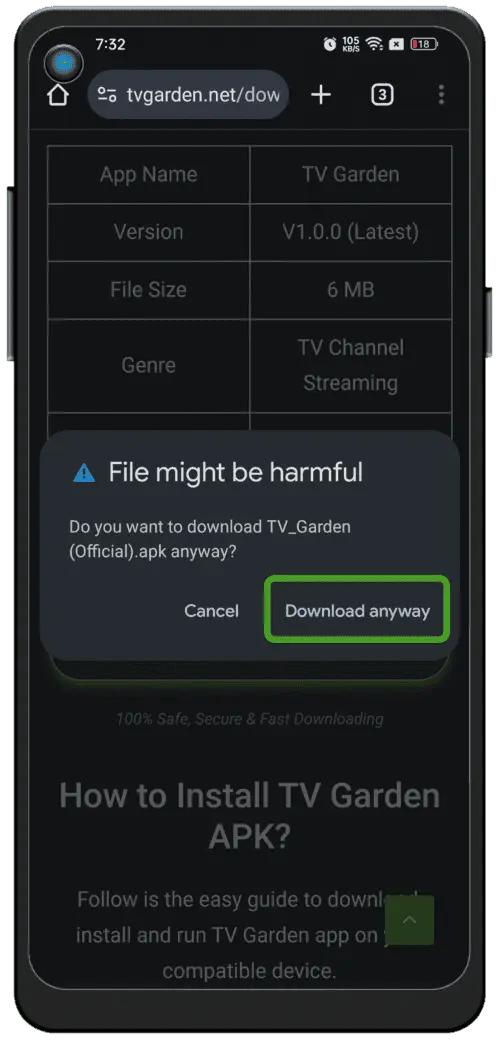
- Tap on the 'Download' button at the top of this webpage
- Wait till the APK file is downloaded completely
- Once the CineGo APK is downloaded, move to the next step to proceed installation.
Step 2: Enable Unknown Sources
- Open the Settings and go to the 'Security' or 'Privacy' section
- Find the 'Install unknown apps' or 'Unknown sources' option
- Enable the Browser or File Manager/My Files that you use to install the APK file

Step 3: Locate the APK File
- Launch the File Manager and go to the Internal Storage, then select the 'Download' folder
- From the list of all downloaded items on your device, scroll down till you find the CineGo APK file
- You can also use the search functionality to easily locate this APK

Step 4: Install & Launch CineGo
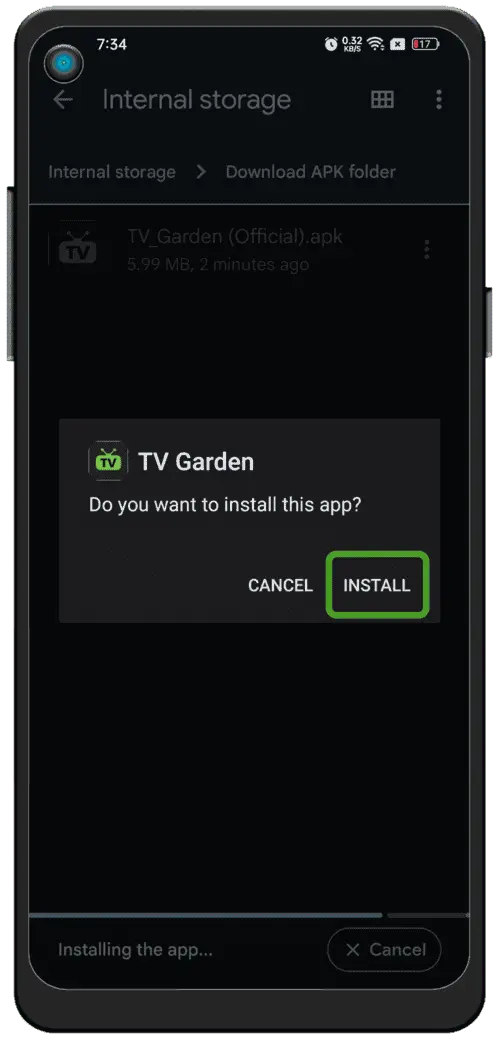
- Click on the CineGo APK File and tap on the 'Install' button
- Go back to the home screen and find the CineGo app icon inside the app drawer
- Hit that icon to launch this app, and you're all set to start streaming live TV channels for free of cost.
By installing this app on your Smart TV, you will be able to enjoy watching your favorite live sports and news channels on the bigger screen devices proving a much better viewing and sound experience, so why wait? Follow these steps to install it right away.
- Step 1: Launch the web browser and search for then tap on the download button to get CineGo APK File.
- Step 2: Open Play Store/App Store and search for File Explorer app then install it on your TV.
- Step 3: Navigate to the Settings >> Security & Restrictions then look for Unknown Sources option and enable it
- Step 4: Go to File Manager and find the folder where you have saved the APK File then click on CineGo APK File to install the app.
- Step 5: Go to the home screen and tap on the CineGo app icon to open it. Now, you can stream live TV channels and watch it for free!
If CineGo doesn't play nice with your device, no stress! There are many similar platforms available that may give you almost the same fun and features, but the tricky part? Sifting through hundreds of them to find the real gems, so here we have done research for you and provided the list of 5 best CineGo alternative options.
- YouTube: Everybody already knows about YouTube, and many popular sports channels and all the biggest news channels are already available on YouTube, that you can watch for free with the ad-supported plan.
- Hulu: The premium verions of Hulu offer hundreds of local and international TV channels to watch reality shows, sports, and movies in various languages.
- Pluto TV: It is a leading American streaming service popular for providing entertainment content, but it also offers 250+ TV channels of genres like comedy, education, and sports.
- YuppTV: A south asian OTT that offers thousands of reality shows, TV series and live events, news, and music. It offers content for all age groups for kids and adults.
- Tubi TV: The Fox Corporation-owned Tubi provides free access to live TV channels to watch popular football leagues like the Super Bowl, exclusive web series, and movies.
How safe is it to use CineGo APK?
Can I Install CineGo on a Smart TV?
Is it legal to use CineGo app?
How to use CineGo on iPhone?
What type of content can I watch on the CineGo app?
Is CineGo available in the USA, UK, Europe, India, Indonesia, and Turkey?
CineGo APK is a free, easy-to-use app for watching live TV. It features a simple design, a dark interface, more than 1,000 TV channels, and high-quality streaming. The app is lightweight, so you can install it and start watching right away. Thousands of people around the world use CineGo to watch live sports and news. What are you waiting for? Download it today on your Android device or Smart TV.